DOM & Events
The Document Object Model (DOM) is JavaScript's interface to HTML. It lets you read, modify, and react to every element on the page.
What is the DOM?
The DOM represents an HTML document as a tree of objects. Each HTML element is a node that can be accessed and manipulated with JavaScript. The document object is the root of this tree.
The document Object
The document object provides access to the entire page:
console.log(document.title);       // Page title
console.log(document.URL);         // Current URL
console.log(document.body);        // <body> element
console.log(document.documentElement); // <html> element
Selecting Elements
getElementById
const header = document.getElementById("main-header");querySelector and querySelectorAll
Use CSS-style selectors for flexible element selection:
// Returns the first match
const firstButton = document.querySelector(".btn");

// Returns all matches as a NodeList
const allButtons = document.querySelectorAll(".btn");

// Complex selectors
const navLinks = document.querySelectorAll("nav a.active");
Performance:
getElementById is faster than querySelector, but querySelector is more flexible. Use whichever is more readable for your use case.
Traversing the DOM
Move between nodes once you have a reference:
const parent = element.parentNode;
const children = element.children;       // HTMLCollection
const firstChild = element.firstElementChild;
const lastChild = element.lastElementChild;
const nextSibling = element.nextElementSibling;
const prevSibling = element.previousElementSibling;
Modifying Content
const el = document.querySelector("#output");

// Change text (safer — prevents XSS)
el.textContent = "New text content";

// Change HTML (use with caution)
el.innerHTML = "<strong>Bold text</strong>";

// Change attributes
el.setAttribute("class", "highlight");
console.log(el.getAttribute("class"));

// Work with classes
el.classList.add("active");
el.classList.remove("inactive");
el.classList.toggle("visible");
console.log(el.classList.contains("active"));
Creating and Removing Elements
// Create a new element
const newDiv = document.createElement("div");
newDiv.textContent = "I was created by JavaScript!";
newDiv.classList.add("box");

// Insert it into the DOM
document.body.appendChild(newDiv);

// Insert at a specific position
const reference = document.querySelector("#container");
reference.insertBefore(newDiv, reference.firstChild);

// Remove an element
const oldEl = document.querySelector(".old");
oldEl.remove(); // Modern approach
// oldEl.parentNode.removeChild(oldEl); // Legacy approach
Event Listeners
React to user interactions with addEventListener:
const button = document.querySelector("#myButton");

button.addEventListener("click", function(event) {
  console.log("Button clicked!", event);
});

// Common events: click, mouseover, mouseout, keydown, keyup,
// submit, focus, blur, change, scroll, resize
The Event Object
The event object provides details about the event:
document.querySelector("a").addEventListener("click", function(e) {
  e.preventDefault(); // Stop default behavior (navigation)
  console.log("Target:", e.target);
  console.log("Type:", e.type);
  console.log("Coordinates:", e.clientX, e.clientY);
});
Event Propagation
Events flow through the DOM in three phases:
- Capturing phase — Event travels from
documentdown to the target - Target phase — Event reaches the target element
- Bubbling phase — Event bubbles back up from target to
document
// Stop propagation
element.addEventListener("click", function(e) {
  e.stopPropagation(); // Prevents bubbling
});

// Use capturing phase instead of bubbling
element.addEventListener("click", handler, true);
// Third parameter: true = capture, false (default) = bubble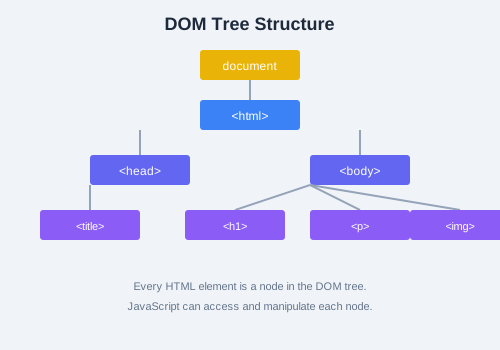
Pro Tip:
e.stopPropagation() stops the event from moving further in the propagation chain. e.stopImmediatePropagation() also prevents other listeners on the same element from firing.
Exercise: Create a simple to-do list with an input field and a button. When the user clicks the button, read the input value, create a new
<li> element, add it to a <ul>, and clear the input. Add a click event on each <li> that toggles a completed class (which strikes through the text).