Build Your First LLM Product
Running LLMs Locally with Ollama
Ollama lets you run open-source LLMs locally. Install it, pull a model, and make your first API call.
# Install Ollama (macOS/Linux)
curl -fsSL https://ollama.com/install.sh | sh

# Pull a model
ollama pull llama3.2

# Python API call
import ollama
response = ollama.chat(model="llama3.2", messages=[
    {"role": "user", "content": "Summarize a website about AI."}
])
print(response["message"]["content"])
LLM Engineering Building Blocks
| Block | Description |
|---|---|
| Models | Base, Chat, and Reasoning variants |
| Tools | Function calling, code execution, search |
| Techniques | Prompt engineering, RAG, fine-tuning |
Understanding LLM Types
- Base Models — Predict next token, need instruction tuning
- Chat Models — Fine-tuned for conversation
- Reasoning Models — Chain-of-thought, math, logic (e.g., o1, DeepSeek-R1)
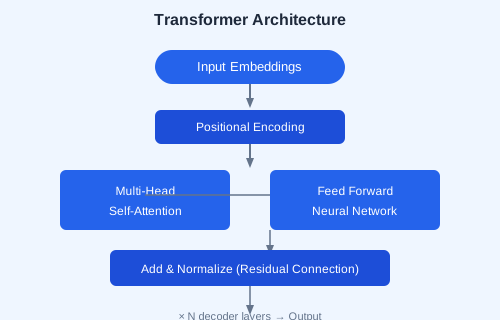
Transformers Architecture
From LSTMs to Transformers — the key innovation is self-attention, which lets the model weigh the importance of all tokens in the input simultaneously.
# Key parameters
# - Parameters: 7B, 13B, 70B (more = more capability)
# - Context Window: 4K, 8K, 128K tokens
# - Tokenization: subword encoding (tiktoken, SentencePiece)
Business Applications
Build a sales brochure generator, chain multiple LLM calls, and stream results for real-time UX.
# Streaming example
for chunk in ollama.chat(model="llama3.2", messages=[...], stream=True):
    print(chunk["message"]["content"], end="", flush=True)
✏️ Exercise: Install Ollama, pull the Llama 3.2 model, and build a website summarizer. Given a URL, fetch the page content and use the LLM to generate a 3-sentence summary. Stream the response token by token.