Vibe Engineering as a Professional
Claude Code CLI
Claude Code is Anthropic's agentic CLI tool. It operates in your terminal with full file system access, git integration, and the ability to run commands.
# Installation
npm install -g @anthropic-ai/claude-code

# Start a session
claude

# Or pipe a prompt directly
echo "Explain this codebase" | claude -p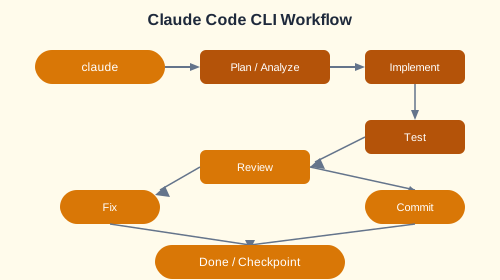
Advanced Controls
| Command | Description |
|---|---|
/plan | Generate a plan before writing code |
/review | Review recent changes |
/checkpoint | Save a session checkpoint |
--yolo | Autonomous mode — run commands without approval |
# Using checkpoints
claude --checkpoint save "pre-refactor"
# ... make changes ...
claude --checkpoint load "pre-refactor"  # Rollback if needed
Ecosystem Extensions: MCP Servers
Model Context Protocol (MCP) servers extend Claude's capabilities with custom tools.
// MCP server configuration in claude.json
{
  "mcpServers": {
    "jira": {
      "command": "node",
      "args": ["mcp-jira-server.js"],
      "env": { "JIRA_TOKEN": "${JIRA_TOKEN}" }
    },
    "github": {
      "command": "node",
      "args": ["mcp-github-server.js"]
    }
  }
}
Professional Integrations
- Jira — Create and update tickets from Claude
- GitHub — PR review, issue management, code review
- Custom Skills — Reusable prompt templates for common tasks
Production SaaS Project
Build a legal document generator SaaS with:
claude.mdproject context file- Custom skills for legal document generation
- Jira integration for feature tracking
- FastAPI backend with user authentication
- Automated deployment pipeline
# claude.md — Project context file
# Project: LegalDoc Generator
# Stack: FastAPI, PostgreSQL, Jinja2 templates
# Conventions: Black formatting, pytest, async views
# Key files: /app/main.py, /app/models/, /app/templates/
✏️ Exercise: Set up Claude Code CLI in a project. Configure an MCP server for GitHub (issue management). Create a
claude.md context file. Build a small SaaS feature end-to-end: create a Jira ticket from Claude, implement the feature, open a PR, and review the PR — all from the CLI.