Code Execution
Common Language Runtime (CoreCLR)
CoreCLR is the runtime that executes .NET applications. It provides garbage collection, security, exception handling, and type safety. When you run a .NET application, CoreCLR loads and executes the compiled Intermediate Language (IL) code.
Intermediate Language (IL)
The C# compiler (csc) compiles source code into IL, a CPU-independent instruction set. IL is packaged in assemblies (.dll or .exe) along with metadata and resources.
// C# source
int Add(int a, int b) => a + b;

// Resulting IL (simplified)
// ldarg.0
// ldarg.1
// add
// ret
Just-In-Time Compilation (JIT)
At runtime, CoreCLR's JIT compiler translates IL into native machine code for the current architecture. JIT compiles methods on demand, caching the native code for subsequent calls. This enables optimizations tailored to the specific CPU and operating system.
Ahead-Of-Time Compilation (NativeAOT)
NativeAOT compiles the entire application into a single native executable with no dependency on CoreCLR at runtime. Benefits include:
- Instant startup (no JIT phase)
- Smaller deployment footprint
- No runtime installation required
- Harder to reverse-engineer
dotnet publish -c Release -r win-x64 --self-contained
# Add <PublishAot>true</PublishAot> in your .csproj to enable NativeAOTEntry Points
Historically, the entry point was the Main method. Starting with C# 9, top-level statements simplify this:
// Traditional Main
class Program
{
    static void Main(string[] args)
    {
        Console.WriteLine("Hello");
    }
}

// Top-level statements (C# 9+)
Console.WriteLine("Hello");
Assembly Loading and Versions
Assemblies are loaded by the Assembly Loader using probing, codebase, or the Global Assembly Cache (GAC). Assembly versioning uses four-part numbers (major.minor.build.revision) and binding redirects control which version loads at runtime.
Assembly asm = Assembly.Load("MyLibrary, Version=1.0.0.0");
Type type = asm.GetType("MyLibrary.MyClass");
var instance = Activator.CreateInstance(type);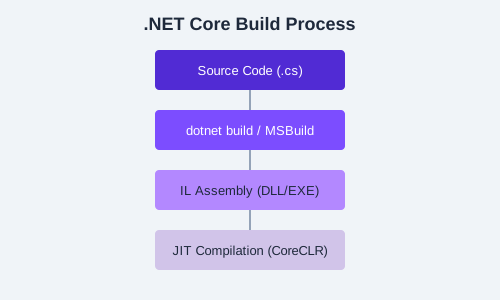
Stopwatch and examine the published output sizes.