4. AI Agents
Agent Service Portal
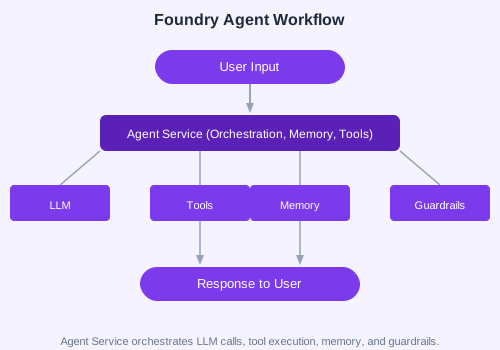
Foundry's Agent Service provides a managed runtime for AI agents. You can create, configure, and monitor agents through the portal or SDK.
Python Agent Example
from azure.ai.projects import AIProjectClient
from azure.identity import DefaultAzureCredential

client = AIProjectClient(
    subscription_id="your-sub",
    resource_group="your-rg",
    project_name="my-project",
    credential=DefaultAzureCredential()
)

agent = client.agents.create_agent(
    model="gpt-4o",
    name="MyFirstAgent",
    instructions="You are a helpful assistant that answers questions about Azure."
)

response = client.agents.send_message(agent.id, "What is Azure AI Foundry?")
print(response.text)
Built-in Tools
| Tool | Description |
|---|---|
| Web Searcher | Search the web for real-time information |
| Code Interpreter | Execute Python code in a sandboxed environment |
| OpenAPI Tool | Call any REST API via OpenAPI spec |
| MCP Server | Connect to MCP-compatible tool servers |
| Azure AI Search | Query vector indexes for RAG |
| Memory Store | Persist conversation history and user context |
Multi-Tool Agent
from azure.ai.projects.models import ToolSet, CodeInterpreterTool, WebSearchTool

toolset = ToolSet()
toolset.add(CodeInterpreterTool())
toolset.add(WebSearchTool())

agent = client.agents.create_agent(
    model="gpt-4o",
    name="MultiToolAgent",
    instructions="Use tools to answer user questions.",
    toolset=toolset
)
Browser Automation
Foundry agents can control browser-based workflows for web scraping, form filling, and testing using Playwright-based automation tools.
Memory Store Concepts
- Volatile — In-memory, session-scoped
- File-based — Local persistence for development
- Cosmos DB — Production-grade, distributed memory
✏️ Exercise: Create an agent with both Web Search and Code Interpreter tools. Ask it to "Search for the latest AI news and summarize the top 3 stories." Verify it uses both tools correctly.