3. Build Your First Agent
Hello World Agent
Let's build a simple agent that greets users and remembers their name.
JavaScript / TypeScript
import { Agent, AgentClient } from "@microsoft/agents";
import { DefaultAzureCredential } from "@azure/identity";

const agent = new Agent({
  name: "GreeterAgent",
  instructions: "You are a friendly greeter. Greet the user warmly and remember their name.",
  model: "gpt-4o",
  auth: new DefaultAzureCredential(),
});

const client = new AgentClient(agent);
const response = await client.sendMessage("Hi, I'm Snehal!");
console.log(response.text);
Agent Configuration
| Property | Description | Example |
|---|---|---|
name | Unique identifier | "GreeterAgent" |
instructions | System prompt defining behavior | "You are a friendly..." |
model | LLM to use | "gpt-4o" |
temperature | Creativity (0-1) | 0.7 |
Prompt Design Best Practices
- Be specific about the agent's role and boundaries
- Include examples of expected interactions (few-shot)
- Define what the agent should not do
- Keep instructions concise but comprehensive
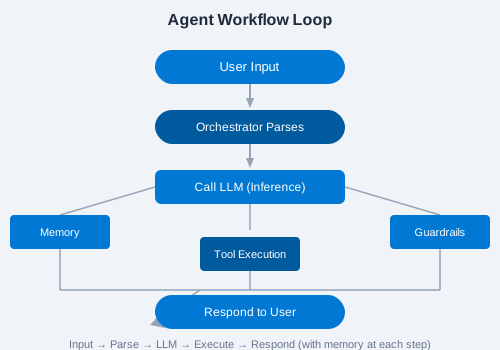
Agent Lifecycle
An agent progresses through these states:
- Created — definition saved
- Configured — memory, tools, and guardrails attached
- Active — ready to receive messages
- Processing — handling a conversation turn
- Idle — waiting for next input
✏️ Exercise: Modify the GreeterAgent to greet the user in a different language based on their preference. Add a
language property to the instructions and test with "Hello" in Spanish, French, and Japanese.