Getting Started with Node.js
What is Node.js?
Node.js is an open-source, cross-platform JavaScript runtime environment built on Chrome's V8 engine. It allows you to run JavaScript on the server side, enabling you to build fast, scalable network applications.
Why Choose Node.js?
- JavaScript Everywhere: Use the same language for frontend and backend.
- High Performance: Built on V8, which compiles JS to native machine code.
- Non-blocking I/O: Handles thousands of concurrent connections with a single thread.
- Rich Ecosystem: NPM provides over 2 million packages.
- Active Community: Backed by OpenJS Foundation and major companies.
System Requirements
- Operating System: Linux, macOS, or Windows
- Memory: Minimum 512 MB RAM (1 GB recommended)
- Disk Space: At least 200 MB for Node.js and NPM
- Node.js Version: LTS (Long Term Support) recommended
Node.js vs Browser JavaScript
| Aspect | Browser | Node.js |
|---|---|---|
| Global Object | window | global |
| DOM/BOM | Available | Not available |
| Module System | ES Modules (import/export) | CommonJS + ES Modules |
| File System | No access | Full access (fs module) |
| Runtime | Sandboxed | Full system access |
Command Line Basics
Node.js is primarily used through the command line. Here are essential commands:
# Check Node.js version
node --version

# Run a JavaScript file
node app.js

# Start REPL (interactive shell)
node

# Run with inspector for debugging
node --inspect app.js

# Execute a one-liner
node -e "console.log('Hello, Node!')"
The V8 Engine
V8 is Google's open-source high-performance JavaScript engine, written in C++. It compiles JavaScript directly to native machine code using JIT (Just-In-Time) compilation. Node.js embeds V8 to execute JavaScript on the server.
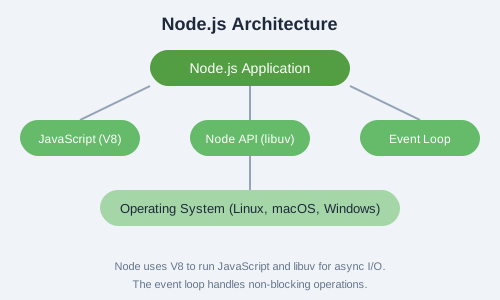
Node.js Architecture
Node.js consists of three main layers:
- JavaScript (V8): Handles your application code and core JS execution.
- Node API (libuv): Provides asynchronous I/O operations like file system, networking, and concurrency.
- Event Loop: Coordinates callbacks and ensures non-blocking execution.
The Event Loop
The event loop is what allows Node.js to perform non-blocking I/O operations despite JavaScript being single-threaded. It works by offloading operations to the system kernel whenever possible.
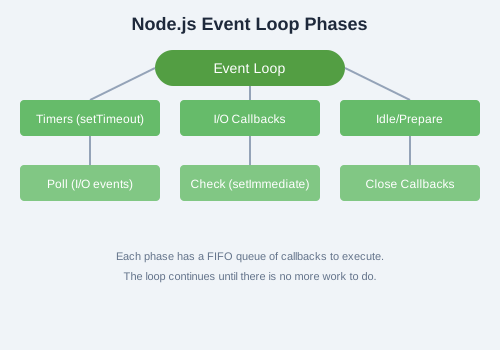
The event loop has several phases:
- Timers: Executes callbacks scheduled by
setTimeout()andsetInterval(). - I/O Callbacks: Executes almost all callbacks except timers, close, and setImmediate.
- Idle/Prepare: Used internally by Node.js.
- Poll: Retrieves new I/O events and executes their callbacks.
- Check: Executes
setImmediate()callbacks. - Close Callbacks: Executes close event callbacks (e.g., socket.on('close')).
Prerequisites
Before diving deeper, ensure you have:
- Basic knowledge of JavaScript (variables, functions, loops, objects)
- Familiarity with command line / terminal
- Node.js installed (download from nodejs.org)
- A code editor (VS Code recommended)
Your First Node.js Application
Create a file named hello.js and add:
// hello.js
console.log("Hello, Node.js!");

// Access process info
console.log("Node version:", process.version);
console.log("Platform:", process.platform);
console.log("Current directory:", process.cwd());
Run it with: node hello.js