3. Core Concepts
npm Setup
npm init -y
npm install @playwright/test
npx playwright install  # installs Chromium, Firefox, WebKit
Test Annotations
import { test, expect } from '@playwright/test';

test('basic test', async ({ page }) => {
  await page.goto('https://example.com');
  await expect(page).toHaveTitle(/Example/);
});

test.skip('skipped test', async ({ page }) => { /* ... */ });
test.fixme('needs fix', async ({ page }) => { /* ... */ });
test.only('run only this', async ({ page }) => { /* ... */ });

// Tags
test('smoke test @smoke', async ({ page }) => { /* ... */ });
Async/Await in Tests
Every Playwright method returns a Promise. Always use await:
test('async patterns', async ({ page }) => {
  await page.goto('https://example.com');
  const title = await page.title();
  const url = page.url();
  const text = await page.textContent('h1');
});
Browser Contexts
Contexts are isolated browser sessions. Each test gets a fresh context by default:
test('isolated context', async ({ browser }) => {
  const context = await browser.newContext();
  const page = await context.newPage();
  await page.goto('https://example.com');
  await context.close();
});
Config File Basics
// playwright.config.ts
import { defineConfig } from '@playwright/test';

export default defineConfig({
  testDir: './tests',
  timeout: 30000,
  retries: 1,
  use: {
    baseURL: 'https://example.com',
    headless: true,
    viewport: { width: 1280, height: 720 },
  },
  projects: [
    { name: 'chromium', use: { browserName: 'chromium' } },
    { name: 'firefox', use: { browserName: 'firefox' } },
  ],
});
Assertions
import { expect } from '@playwright/test';

await expect(page).toHaveTitle('Dashboard');
await expect(page.locator('.success')).toBeVisible();
await expect(page.locator('button')).toBeEnabled();
await expect(page.locator('input')).toHaveValue('test');
await expect(page.locator('ul li')).toHaveCount(5);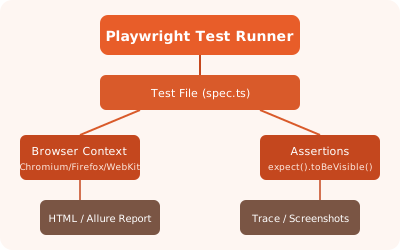
✏️ Exercise: Create a Playwright config file with two projects (chromium, firefox), set a base URL, and write a test that navigates to a site and asserts the title.