Welcome to Progressive Web Apps
What are Progressive Web Apps?
Progressive Web Apps (PWAs) are web applications that use modern web capabilities to deliver an app-like experience to users. They are reliable, fast, and engaging, combining the best of web and native apps.
Core Principle: PWAs are websites that progressively evolve to feel like native apps. They work offline, load instantly, and can be installed on the user's device.
Why PWAs?
- Reliable: Load instantly, even on slow networks or offline.
- Fast: Respond quickly to user interactions.
- Engaging: Feel like a natural app with an immersive experience.
- No Install Friction: Users can try the PWA without installing from an app store.
- Cross-Platform: One codebase for all platforms and devices.
How PWAs Work
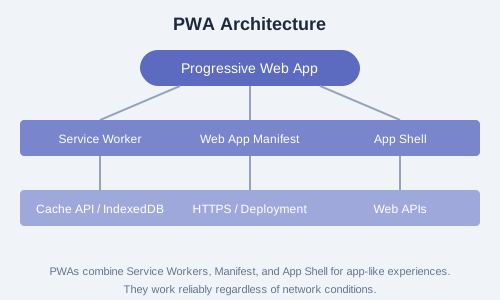
PWAs are built on three core technologies:
- Service Worker: A JavaScript file that runs in the background, enabling offline functionality, caching, and push notifications.
- Web App Manifest: A JSON file that controls how the PWA appears when installed, including name, icons, and display mode.
- App Shell: The minimal HTML, CSS, and JavaScript needed to render the user interface, cached for instant loading.
Progressive Enhancement Philosophy
PWAs embrace progressive enhancement — they work for every user regardless of browser choice, but deliver an enhanced experience for users on modern browsers. This means your PWA is still a functional website for everyone.
Browser Support
PWAs are supported in Chrome, Firefox, Edge, Safari (starting with iOS 16.4+), and Samsung Internet. Key features like Service Workers and Web App Manifest are widely supported across modern browsers.
Exercise: Visit a well-known PWA like Twitter, Pinterest, or Spotify on your mobile browser. Notice the install prompt, offline behavior, and app-like navigation. Write down three observations about the user experience.