Service Workers
What is a Service Worker?
A Service Worker is a JavaScript file that runs in the background, separate from the web page. It acts as a programmable network proxy, intercepting network requests and enabling offline functionality.
Key Characteristics: Runs on its own thread, has no DOM access, works offline, and is only active when needed (event-driven).
Service Worker Lifecycle
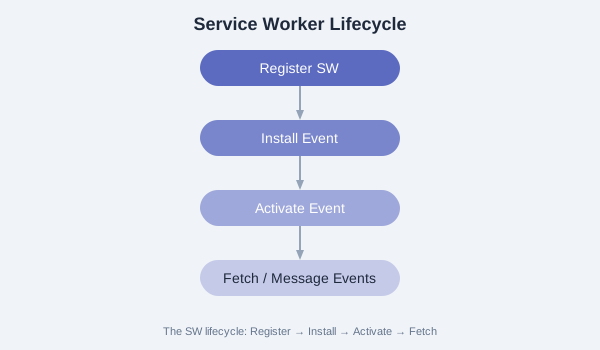
- Registration: The page registers the Service Worker file.
- Install: Fired when the browser installs the SW. Ideal for precaching assets.
- Activate: Fired after installation. Used for cleanup and claiming clients.
- Fetch/Message: The SW intercepts network requests and listens for messages.
Registration
// Register the Service Worker
if ('serviceWorker' in navigator) {
  window.addEventListener('load', async () => {
    try {
      const registration = await navigator.serviceWorker.register('/sw.js', {
        scope: '/'  // Controls which pages the SW controls
      });
      console.log('SW registered:', registration.scope);

      // Check for updates
      registration.addEventListener('updatefound', () => {
        const newWorker = registration.installing;
        console.log('New SW found:', newWorker);
      });
    } catch (err) {
      console.error('SW registration failed:', err);
    }
  });
}
Event Handling
// sw.js - Full lifecycle example
const CACHE = 'my-pwa-v1';

// Install event
self.addEventListener('install', (event) => {
  console.log('SW: Installing...');
  event.waitUntil(
    caches.open(CACHE).then(cache => {
      return cache.addAll([
        '/',
        '/index.html',
        '/css/styles.css',
        '/js/app.js',
        '/offline.html'
      ]);
    })
  );
  self.skipWaiting();
});

// Activate event
self.addEventListener('activate', (event) => {
  console.log('SW: Activating...');
  event.waitUntil(
    caches.keys().then(keys => {
      return Promise.all(
        keys.filter(key => key !== CACHE)
          .map(key => caches.delete(key))
      );
    })
  );
  self.clients.claim();
});

// Fetch event - intercept network requests
self.addEventListener('fetch', (event) => {
  event.respondWith(
    caches.match(event.request)
      .then(cached => {
        // Return cached response or fetch from network
        const fetchPromise = fetch(event.request).then(response => {
          // Cache the new response
          return caches.open(CACHE).then(cache => {
            cache.put(event.request, response.clone());
            return response;
          });
        });
        return cached || fetchPromise;
      })
  );
});

// Message event - listen for messages from the page
self.addEventListener('message', (event) => {
  if (event.data.type === 'SKIP_WAITING') {
    self.skipWaiting();
  }
});
Scope and Control
The scope option in registration defines which pages the Service Worker controls. By default, the scope is the directory containing the SW file. To expand scope, set the Service-Worker-Allowed HTTP header.
Exercise: Create a Service Worker that logs all fetch events. Register it on a simple HTML page, open DevTools > Application > Service Workers, and observe the lifecycle events as you reload the page.