React Hooks
Introduction to Hooks
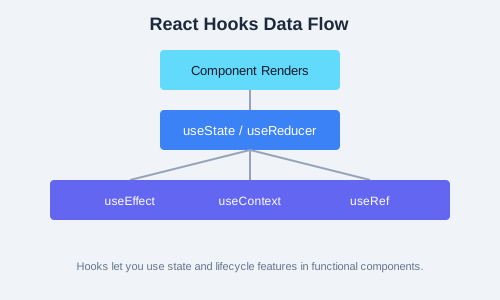
React Hooks were introduced in React 16.8 (2019) as a way to use state and other React features without writing a class. Before hooks, functional components were limited to rendering props and could not manage state or side effects. Hooks solve this by providing dedicated functions for state management, side effects, context consumption, and more.
useState
The useState hook lets you add state to functional components. It returns an array with two elements: the current state value and a setter function to update it. You can call useState multiple times in a single component to manage different pieces of state.
// Counter with useState
function Counter() {
  const [count, setCount] = useState(0);
  const [step, setStep] = useState(1);

  return (
    <div>
      <p>Count: {count}</p>
      <button onClick={() => setCount(c => c + step)}>+{step}</button>
      <button onClick={() => setStep(s => s + 1)}>Increase Step</button>
    </div>
  );
}
Form Fields with useState
function LoginForm() {
  const [email, setEmail] = useState('');
  const [password, setPassword] = useState('');
  const [errors, setErrors] = useState({});

  const handleSubmit = (e) => {
    e.preventDefault();
    const newErrors = {};
    if (!email) newErrors.email = 'Email is required';
    if (!password) newErrors.password = 'Password is required';
    setErrors(newErrors);
  };

  return (
    <form onSubmit={handleSubmit}>
      <input value={email} onChange={e => setEmail(e.target.value)} />
      {errors.email && <p>{errors.email}</p>}
      <input type="password" value={password} onChange={e => setPassword(e.target.value)} />
      {errors.password && <p>{errors.password}</p>}
      <button type="submit">Login</button>
    </form>
  );
}
useEffect
The useEffect hook lets you perform side effects in functional components. Side effects include data fetching, subscriptions, timers, and manually changing the DOM. The effect runs after every render by default, but you can control this with the dependency array.
// Data fetching with useEffect
function UserProfile({ userId }) {
  const [user, setUser] = useState(null);
  const [loading, setLoading] = useState(true);

  useEffect(() => {
    let cancelled = false;

    async function fetchUser() {
      setLoading(true);
      const response = await fetch(`/api/users/${userId}`);
      const data = await response.json();
      if (!cancelled) {
        setUser(data);
        setLoading(false);
      }
    }

    fetchUser();

    return () => {
      cancelled = true; // Cleanup on unmount or userId change
    };
  }, [userId]);

  if (loading) return <p>Loading...</p>;
  return <h2>{user.name}</h2>;
}
useContext
The useContext hook lets you subscribe to React context without introducing nesting. It accepts a context object (created with React.createContext) and returns the current context value. This is useful for global state like themes, locale settings, or authentication status.
const ThemeContext = React.createContext('light');

function ThemedButton() {
  const theme = useContext(ThemeContext);
  return (
    <button style={{
      background: theme === 'dark' ? '#333' : '#fff',
      color: theme === 'dark' ? '#fff' : '#333'
    }}>
      {theme} mode
    </button>
  );
}

function App() {
  const [theme, setTheme] = useState('light');
  return (
    <ThemeContext.Provider value={theme}>
      <ThemedButton />
      <button onClick={() => setTheme(t => t === 'light' ? 'dark' : 'light')}>
        Toggle Theme
      </button>
    </ThemeContext.Provider>
  );
}
useRef
The useRef hook returns a mutable ref object whose .current property persists across re-renders. It is commonly used to access DOM elements directly or to store mutable values that should not trigger re-renders when changed.
// DOM ref example
function AutoFocusInput() {
  const inputRef = useRef(null);

  useEffect(() => {
    inputRef.current.focus();
  }, []);

  return <input ref={inputRef} type="text" />;
}

// Storing a mutable value (no re-render)
function Timer() {
  const intervalRef = useRef();

  const startTimer = () => {
    intervalRef.current = setInterval(() => {
      console.log('Tick');
    }, 1000);
  };

  const stopTimer = () => {
    clearInterval(intervalRef.current);
  };

  return (
    <div>
      <button onClick={startTimer}>Start</button>
      <button onClick={stopTimer}>Stop</button>
    </div>
  );
}
useReducer
The useReducer hook is an alternative to useState for managing complex state logic. It accepts a reducer function and an initial state, returning the current state and a dispatch function. It is particularly useful when state transitions depend on previous state or when multiple sub-values are involved.
function todoReducer(state, action) {
  switch (action.type) {
    case 'ADD':
      return [...state, { id: Date.now(), text: action.payload, done: false }];
    case 'TOGGLE':
      return state.map(t =>
        t.id === action.payload ? { ...t, done: !t.done } : t
      );
    case 'DELETE':
      return state.filter(t => t.id !== action.payload);
    default:
      return state;
  }
}

function TodoApp() {
  const [todos, dispatch] = useReducer(todoReducer, []);
  const [input, setInput] = useState('');

  const addTodo = () => {
    if (input.trim()) {
      dispatch({ type: 'ADD', payload: input });
      setInput('');
    }
  };

  return (
    <div>
      <input value={input} onChange={e => setInput(e.target.value)} />
      <button onClick={addTodo}>Add</button>
      {todos.map(t => (
        <div key={t.id}>
          <span style={{ textDecoration: t.done ? 'line-through' : 'none' }}
                onClick={() => dispatch({ type: 'TOGGLE', payload: t.id })}>
            {t.text}
          </span>
          <button onClick={() => dispatch({ type: 'DELETE', payload: t.id })}>X</button>
        </div>
      ))}
    </div>
  );
}
useCallback & useMemo
useCallback returns a memoized callback function that only changes when one of its dependencies changes. useMemo returns a memoized value that is only recomputed when dependencies change. Both are optimization hooks to prevent unnecessary re-renders.
function ExpensiveList({ items, filter }) {
  const filteredList = useMemo(() => {
    return items.filter(item => item.category === filter);
  }, [items, filter]);

  const handleItemClick = useCallback((id) => {
    console.log('Clicked:', id);
  }, []);

  return (
    <ul>
      {filteredList.map(item => (
        <li key={item.id} onClick={() => handleItemClick(item.id)}>{item.name}</li>
      ))}
    </ul>
  );
}
Custom Hooks
Custom hooks let you extract component logic into reusable functions. A custom hook is a JavaScript function whose name starts with use and that may call other hooks. They enable logic sharing without changing the component hierarchy.
// useFetch custom hook
function useFetch(url) {
  const [data, setData] = useState(null);
  const [loading, setLoading] = useState(true);
  const [error, setError] = useState(null);

  useEffect(() => {
    setLoading(true);
    fetch(url)
      .then(res => res.json())
      .then(setData)
      .catch(setError)
      .finally(() => setLoading(false));
  }, [url]);

  return { data, loading, error };
}

// Usage
function UsersPage() {
  const { data, loading, error } = useFetch('/api/users');
  if (loading) return <p>Loading...</p>;
  if (error) return <p>Error: {error.message}</p>;
  return <p>Users: {data.length}</p>;
}
useLocalStorage
function useLocalStorage(key, initialValue) {
  const [storedValue, setStoredValue] = useState(() => {
    try {
      const item = window.localStorage.getItem(key);
      return item ? JSON.parse(item) : initialValue;
    } catch (error) {
      return initialValue;
    }
  });

  const setValue = (value) => {
    setStoredValue(value);
    window.localStorage.setItem(key, JSON.stringify(value));
  };

  return [storedValue, setValue];
}
useWindowSize
function useWindowSize() {
  const [size, setSize] = useState({
    width: window.innerWidth,
    height: window.innerHeight,
  });

  useEffect(() => {
    const handleResize = () => {
      setSize({ width: window.innerWidth, height: window.innerHeight });
    };
    window.addEventListener('resize', handleResize);
    return () => window.removeEventListener('resize', handleResize);
  }, []);

  return size;
}
Practice Task
Create a custom hook called useDebounce that takes a value and a delay (in milliseconds) and returns a debounced version of the value. Use this hook in a search input component that fetches search results from a mock API only after the user has stopped typing for 500ms. Display the results in a list below the input.