Getting Started with Angular
What is Angular?
Angular is a TypeScript-based open-source front-end web application framework led by the Angular team at Google. It is designed for building dynamic, single-page applications (SPAs) with a rich, responsive user interface. First released in 2016 as a complete rewrite of AngularJS, Angular provides a comprehensive solution for client-side development including data binding, dependency injection, routing, and form handling out of the box.
Key Features of Angular
- Component-based architecture — Build encapsulated, reusable UI pieces.
- Dependency Injection — Built-in DI system for manageble, testable code.
- Powerful templating — Declarative templates with data binding, directives, and pipes.
- RxJS integration — Reactive programming model using Observables.
- Router — Feature-rich client-side routing with lazy loading.
- Forms — Both template-driven and reactive forms with validation.
- CLI — Command-line tool for scaffolding, building, testing, and deploying.
Pros and Cons
Pros
- Full-featured framework — includes routing, HTTP client, forms, and more.
- Strong typing with TypeScript improves code quality and maintainability.
- Excellent tooling with Angular CLI and IDE support.
- Modular architecture promotes separation of concerns.
- Large ecosystem and community support.
Cons
- Steep learning curve compared to lighter frameworks like React or Vue.
- Larger bundle size out of the box.
- Complexity can be overkill for small projects.
- Frequent major version changes require migration effort.
Environment Setup
Before you start, install the following prerequisites:
- Node.js — Download from nodejs.org. Angular requires an active LTS version. Verify with
node --version. - npm — Comes with Node.js. Verify with
npm --version. - Angular CLI — Install globally:
npm install -g @angular/cli. Verify withng version.
Creating Your First App
Open a terminal and run the following commands:
ng new my-first-app
cd my-first-app
ng serve
The ng serve command starts a development server at http://localhost:4200. Open that URL in your browser to see your app running. Any changes you make to source files will automatically reload the browser.
Project Structure
Here is the typical structure of an Angular project:
my-first-app/
  src/
    app/
      app.component.ts    # Root component class
      app.component.html  # Root component template
      app.component.css   # Root component styles
      app.module.ts       # Root module
    assets/               # Static files (images, fonts)
    index.html            # Entry HTML file
    main.ts               # Bootstrap entry point
    styles.css            # Global styles
  angular.json            # CLI configuration
  package.json            # npm dependencies
  tsconfig.json           # TypeScript configuration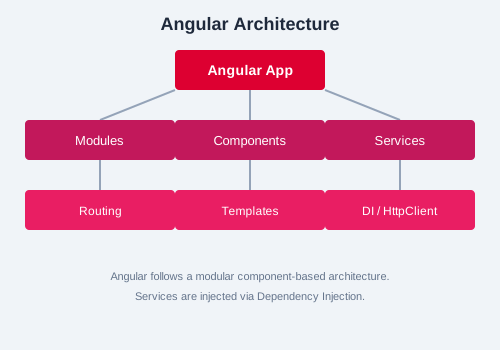
MVC Architecture in Angular
Angular follows a component-based variation of the MVC (Model-View-Controller) pattern. The Model is represented by services and data models, the View by templates (HTML), and the Controller by component classes that manage the logic and state. Unlike traditional MVC, Angular binds these layers together through dependency injection and data binding, creating a cohesive, testable structure.
Understanding Modules
Every Angular app has at least one module — the root module (AppModule). Modules are decorated with @NgModule and declare which components, directives, pipes, and services belong together. They help organize code into cohesive blocks of functionality.
import { NgModule } from '@angular/core';
import { BrowserModule } from '@angular/platform-browser';
import { AppComponent } from './app.component';

@NgModule({
  declarations: [AppComponent],
  imports: [BrowserModule],
  providers: [],
  bootstrap: [AppComponent]
})
export class AppModule { }
Main Entry Point
The main.ts file bootstraps the application by passing the root module to the platform:
import { platformBrowserDynamic } from '@angular/platform-browser-dynamic';
import { AppModule } from './app/app.module';

platformBrowserDynamic().bootstrapModule(AppModule)
  .catch(err => console.error(err));
Summary
In this chapter, you learned what Angular is, its core features, how to set up your environment, create a new project, and understand the project structure and MVC architecture. You are now ready to dive into components in Chapter 2.
hello-angular using ng new. Run ng serve, open http://localhost:4200, and verify you see the default Angular welcome page. Then explore the generated project files and identify each part of the MVC pattern.