Colors & Backgrounds
CSS Colors
Colors can be specified in several ways:
Named Colors
h1 { color: red; }
p { color: navy; }
Hex Colors
h1 { color: #ff0000; }
p { color: #000080; }
RGB and RGBA
h1 { color: rgb(255, 0, 0); }
div { background: rgba(0, 0, 255, 0.5); }
HSL
h1 { color: hsl(0, 100%, 50%); }
div { background: hsla(240, 100%, 50%, 0.5); }
Background Properties
background-color
body { background-color: #f4f4f4; }background-image
header {
  background-image: url("banner.jpg");
}
Borders
Borders have three properties: width, style, and color.
div {
  border-width: 2px;
  border-style: solid;
  border-color: #333;
}
Shorthand
div {
  border: 2px solid #333;
}
Margins and Padding
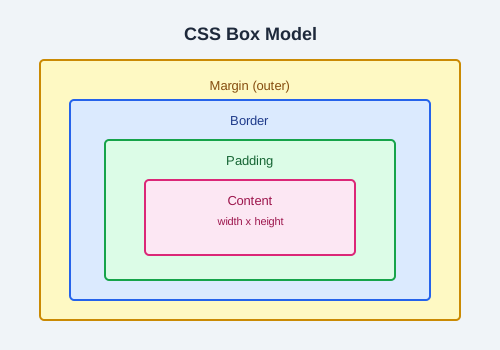
Margin creates space outside the element. Padding creates space inside the element, between the content and the border.
div {
  margin: 20px;
  padding: 15px;
}
Height and Width
div {
  height: 200px;
  width: 50%;
}
Outline
An outline is drawn outside the border edge and does not affect layout.
input:focus {
  outline: 2px solid blue;
}
Note: Unlike borders, outlines do not take up space and may overlap other elements.
Practice Task
Create a card component with a background color, a solid border, rounded corners (use border-radius), padding inside, and a margin around it.