Getting Started
What is .NET Core?
.NET Core is a cross-platform, open-source, modular framework for building modern applications. Unlike the traditional .NET Framework, .NET Core runs on Windows, Linux, and macOS. It was designed from the ground up to be lightweight, fast, and suitable for cloud and microservices architectures.
Cross-Platform
One of the most significant advantages is its cross-platform nature. You can develop and deploy on any supported operating system without recompiling. This makes it ideal for containerized environments like Docker and hybrid cloud deployments.
Open-Source
The entire .NET Core runtime, libraries, and tooling are open-source under the MIT license. The source code is hosted on GitHub, and the community actively contributes features, bug fixes, and improvements.
Modular Design
.NET Core is modular through NuGet packages. You include only the packages you need, reducing the footprint of your application. This is a departure from the monolithic .NET Framework where the entire base class library was bundled.
.NET vs .NET Framework vs Mono
Understanding the ecosystem is essential. The classic .NET Framework is Windows-only and ships with the OS. Mono is an open-source implementation that enabled .NET on other platforms before .NET Core existed. .NET Core (now simply .NET 5/6/7/8+) unifies all three into a single cross-platform offering.
Prerequisites
Before you begin, install the .NET SDK from dotnet.microsoft.com/download. The SDK includes the runtime, the dotnet CLI, and the compiler.
Verify Installation
dotnet --versionThis should print something like 8.0.100.
First Steps: Hello World
Create a new console application and run it:
dotnet new console -n HelloWorld
cd HelloWorld
dotnet run
The dotnet new console command scaffolds a minimal project with a single Program.cs file that prints "Hello, World!" to the console.
Modify the Program
Open Program.cs in any text editor and change the output:
Console.WriteLine("Hello from .NET Core!");Run again with dotnet run to see your change.
Project Structure
A basic .NET project consists of:
- Program.cs — the entry point of the application
- .csproj — the project file that defines dependencies, target framework, and build settings
- bin/ and obj/ — build output and intermediate directories (generated, not checked into source control)
Understanding the Build Process
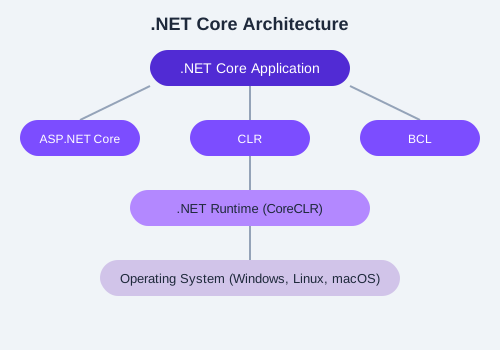
The image above illustrates the high-level architecture of .NET Core: the runtime (CoreCLR), the base class libraries (CoreFX), and the SDK/tooling layer work together to build and execute your application.
MyFirstApp, modify Program.cs to print your name, and run it. Experiment with dotnet build and observe the files created in bin/.