Development Environment
The .NET SDK
The .NET SDK (Software Development Kit) includes everything you need to build and run .NET applications: the runtime, the compiler, the dotnet CLI, and the MSBuild engine. Install it once and you are ready to develop on any platform.
SDK vs Runtime
The runtime is required to run applications. The SDK is required to build them. If you are deploying a framework-dependent app, only the runtime needs to be on the target machine. For development, always install the SDK.
The dotnet CLI
The dotnet command-line interface is the primary tool for all .NET development tasks. It provides a consistent experience across operating systems.
Common CLI Commands
dotnet new <template>   # Create a new project
dotnet restore           # Restore NuGet dependencies
dotnet build             # Build the project
dotnet run               # Build and run
dotnet test              # Run unit tests
dotnet publish           # Publish for deployment
dotnet pack              # Create a NuGet package
Visual Studio
Visual Studio is a full-featured IDE available in three editions:
- Community — Free for individual developers, open-source contributors, and small teams
- Professional — Paid edition with advanced tooling for professional developers
- Enterprise — Premium edition with architecture tools, load testing, and advanced debugging
Visual Studio provides IntelliSense, debugging, profiling, integrated testing, and project templates. It is the most productive choice for Windows developers.
VS Code with C# Dev Kit
For a lightweight, cross-platform editor, Visual Studio Code with the C# Dev Kit extension is excellent. It provides:
- IntelliSense and code navigation
- Built-in terminal for
dotnetcommands - Debugging support
- Git integration
- Extensions for testing, Docker, and more
Project Templates
The dotnet new command supports many built-in templates:
dotnet new console      # Console application
dotnet new web          # ASP.NET Core empty web app
dotnet new webapi       # ASP.NET Core Web API
dotnet new mvc          # ASP.NET Core MVC
dotnet new classlib     # Class library
dotnet new xunit        # xUnit test project
List all available templates with dotnet new list.
dotnet new install <package-id>, which enables sharing project scaffolding across teams.
Choosing the Right IDE
Your choice depends on your workflow. Visual Studio is best for large enterprise solutions with many projects. VS Code is ideal for cross-platform development, microservices, and containerized apps. JetBrains Rider is another popular cross-platform IDE with excellent .NET support.
Build Process Overview
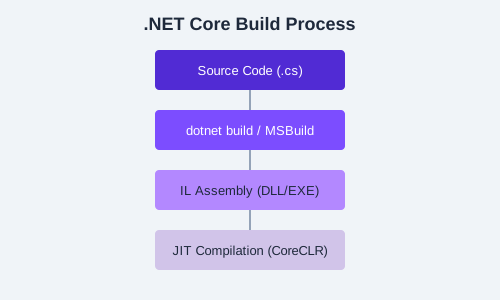
The diagram above shows how source code, project files, and dependencies flow through the build pipeline. The dotnet build command compiles your C# code into Intermediate Language (IL) that the runtime can execute.
dotnet new webapi -n MyApi), open it in your chosen editor, and run it. Browse to the Swagger endpoint to see the auto-generated API documentation.