Getting Started with HTML
What is HTML?
HTML stands for HyperText Markup Language. It is the standard language used to create and structure content on the web. Every website you visit is built using HTML (along with CSS and JavaScript).
Your First HTML Page
An HTML file is just a plain text file with a .html extension. Here's the simplest possible HTML page:
<!DOCTYPE html>
<html>
  <head>
    <title>My First Page</title>
  </head>
  <body>
    <h1>Hello, World!</h1>
    <p>This is my first HTML page.</p>
  </body>
</html>
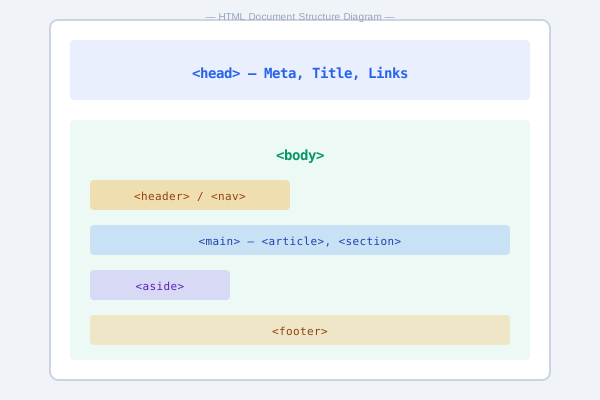
HTML Document Structure
Let's break down what each part means:
<!DOCTYPE html>— tells the browser this is an HTML5 document<html>— the root element that wraps all content<head>— contains meta-information (title, links, styles)<body>— contains the visible content of the page
Tools You Need
- A text editor: VS Code (recommended), Notepad++, or any basic text editor
- A web browser: Chrome, Firefox, Edge, or Safari
! and press Tab to auto-generate a basic HTML skeleton.
HTML Tags & Elements
HTML uses tags to mark up content. Most tags come in pairs — an opening tag and a closing tag:
<tagname>content goes here</tagname>Some tags are self-closing (void elements):
<br> <hr> <img src="...">Understanding Attributes
Tags can have attributes that provide additional information:
<a href="https://example.com">Visit Example</a>
<img src="photo.jpg" alt="A beautiful sunset">
Here href, src, and alt are attributes.
Comments in HTML
Comments help you document your code and are ignored by the browser:
<!-- This is a comment -->
<!-- TODO: Add navigation menu here -->
Practice Task
Create a new file called my-first-page.html. Write a complete HTML document that includes:
- A proper
<!DOCTYPE html>declaration - A descriptive
<title> - At least one
<h1>heading - Two paragraphs of text (
<p>) - An HTML comment
Open it in your browser to see the result!