Text & Structure
Headings
HTML provides six levels of headings, from <h1> (most important) to <h6> (least important):
<h1>Main Title</h1>
<h2>Section Heading</h2>
<h3>Sub-section Heading</h3>
<h4>Detailed Sub-section</h4>
<h5>Minor Heading</h5>
<h6>Smallest Heading</h6>
SEO Tip: Use only one
<h1> per page, and nest headings hierarchically — don't skip levels.
Paragraphs
Use the <p> tag for paragraphs. Browsers automatically add space before and after each paragraph:
<p>This is a paragraph of text. It can contain several sentences and will wrap naturally.</p>
<p>This is another paragraph.</p>
Text Formatting
HTML offers many inline elements for styling text:
<strong>Bold text</strong>        <!-- Important text -->
<em>Italic text</em>            <!-- Emphasized text -->
<u>Underlined text</u>
<mark>Highlighted text</mark>
<small>Smaller text</small>
<del>Deleted text</del>
<ins>Inserted text</ins>
<sup>Superscript</sup>         <!-- e.g., E=mc² -->
<sub>Subscript</sub>           <!-- e.g., H₂O -->
Output: Bold, Italic, Underlined, Marked, small, deleted, inserted, E=mc2, H2O.
Lists
Unordered Lists
<ul>
  <li>Apples</li>
  <li>Bananas</li>
  <li>Oranges</li>
</ul>
Renders as a bullet-point list.
Ordered Lists
<ol>
  <li>First step</li>
  <li>Second step</li>
  <li>Third step</li>
</ol>
Renders as a numbered list.
Definition Lists
<dl>
  <dt>HTML</dt>
  <dd>HyperText Markup Language</dd>
  <dt>CSS</dt>
  <dd>Cascading Style Sheets</dd>
</dl>
Quotations
<blockquote cite="https://example.com">
  This is a long block quotation.
</blockquote>

The philosopher said, <q>Cogito ergo sum</q>.
Semantic HTML for Structure
Semantic tags clearly describe their meaning to both the browser and developers:
<header>  <!-- Site or section header -->
<nav>     <!-- Navigation links -->
<main>    <!-- Primary content -->
<article> <!-- Self-contained content -->
<section> <!-- Themed section -->
<aside>   <!-- Sidebar / related content -->
<footer>  <!-- Footer -->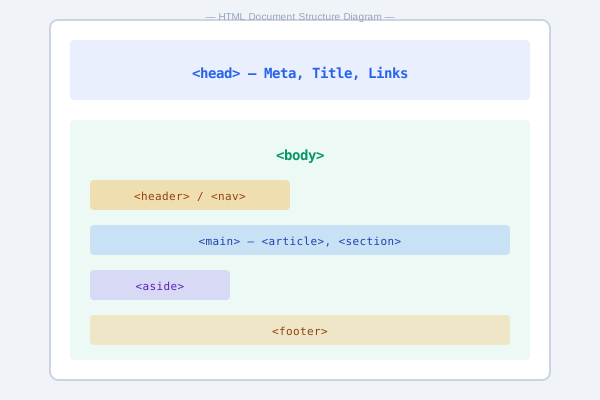
Why semantic HTML matters: It improves accessibility (screen readers rely on it), SEO, and code readability.
Line Breaks & Horizontal Rules
<p>First line<br>Second line</p>
<hr>  <!-- Thematic break -->
Practice Task
Create an HTML page about your favorite hobby. Include:
- A main heading (
<h1>) - At least two sub-headings (
<h2>) - A paragraph for each section
- An unordered list and an ordered list
- Use
<strong>and<em>in your text - Wrap everything in semantic tags (
<article>,<section>)