Getting Started with React
What is React?
React is a declarative, efficient, and flexible JavaScript library for building user interfaces. It was created by Jordan Walke, a software engineer at Facebook, and first deployed on Facebook's News Feed in 2011 and on Instagram in 2012. React made its source code available at JSConf US in May 2013.
React allows developers to build large, complex web applications that can change data without reloading the page. The main purpose of React is to be fast, scalable, and simple. It works only on the user interface in the application, which corresponds to the view in the MVC template.
Single Page Applications (SPA)
A Single Page Application (SPA) is a web application that loads a single HTML page and dynamically updates that page as the user interacts with the app. React is particularly well-suited for building SPAs because of its component-based architecture and efficient virtual DOM diffing algorithm.
The Virtual DOM
React maintains a lightweight representation of the real DOM in memory, known as the virtual DOM. When the state of an object changes, React updates the virtual DOM first, then compares it with the previous snapshot using a diffing algorithm. Finally, it calculates the most efficient way to update the real DOM with the minimum number of operations.
// Virtual DOM in action
const element = <h1>Hello, World!</h1>;
// React creates a virtual DOM tree
// When state changes, React diffs and patches
Learning Roadmap
Here is a recommended path for learning React:
- JavaScript Fundamentals: ES6+ features (arrow functions, destructuring, spread operator, template literals, modules)
- React Basics: JSX, components, props, and state
- Intermediate: Event handling, conditional rendering, lists and keys
- Advanced: Hooks, context API, refs, and custom hooks
- Ecosystem: React Router, state management, testing, and deployment
Installation & Setup
Before you start building React applications, you need to install Node.js and npm. Node.js provides a JavaScript runtime environment, while npm is the package manager used to install React and other dependencies.
Using Create React App
npx create-react-app my-app
cd my-app
npm start
Using Vite (Recommended)
npm create vite@latest my-app -- --template react
cd my-app
npm install
npm run devKey Features of React
- Declarative: React makes it easy to create interactive UIs by declaring how your UI should look based on different states.
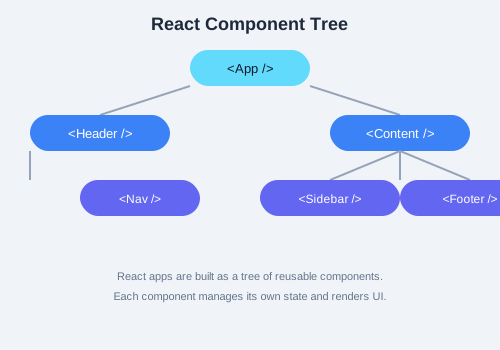
- Component-Based: Build encapsulated components that manage their own state, then compose them to make complex UIs.
- Learn Once, Write Anywhere: React can be used to build web apps (React DOM), mobile apps (React Native), and even desktop apps (Electron + React).
- Unidirectional Data Flow: Data flows from parent to child components via props, making the application easier to understand and debug.
- Rich Ecosystem: React has a vast ecosystem of libraries, tools, and community support.
Pros & Cons
Advantages
- Fast rendering with virtual DOM
- Reusable component architecture
- Strong community and ecosystem
- SEO-friendly with server-side rendering (Next.js)
- Excellent developer tools (React DevTools)
Disadvantages
- Steep learning curve for beginners
- JSX can be confusing at first
- Frequent updates and breaking changes
- Boilerplate code for complex setups
Folder Structure
A typical React project created with Vite has the following structure:
my-app/
  node_modules/      # Dependencies
  public/            # Static assets
  src/
    App.jsx          # Main application component
    App.css          # Styles for App component
    index.css        # Global styles
    main.jsx         # Entry point
  index.html         # HTML template
  package.json       # Project metadata and dependencies
  vite.config.js     # Vite configuration
Practice Task
Create a new React project using Vite. Inside the App.jsx file, modify the default content to display your name and a short description of why you want to learn React. Run the development server and verify it works in your browser.